Writing on the Wall?

One of the rights of passage for students was the seemingly endless practice of handwriting skills or cursive writing. All those loops, making j's, q's, z's over and over. Those who have seen my handwriting wonder if I skipped school on the days my class had cursive practice. Earlier this week my principal shared an email from a parent who expressed concern there was no focus cursive writing instruction and her daughter could not do a good job signing her name. This got me thinking, is cursive writing one of time-honored skills that is about to be pushed aside by technology or other forces in education today?

More and more, students complete assignments requiring keyboarding skills. Essays are now written using word processing, presentations are completed using PowerPoint instead of poster board. Even if poster boards are used, information is typed on paper using a word processor then glued on the board. Many students are all thumbs with their writing as they use mobile devices to text, share snippets of their lives on Facebook, or compose a rare email. As more and more computer devices get in the hands of students, it will be keyboards that will rule as text input.

What about pens as in penmanship? Pens are getting smarter too. Smartpens are slowly making their way into classrooms and offices. Livescribe, a leading manufacture of smartpens, just released the Echo to go along with the Pulse. Smartpens can record information written down then transfer it to a computer. After syncing the information, you can use MyScript for Livescribe to turn what you write into editable text you can copy and paste into many other applications such as Word or blogs. While MyScript did convert a sample of cursive writing I did as a test but the results were not as good as when I print. 

Finally, is there just not enough time to teach the art of cursive writing anymore? Teachers are squeezed by the pressures of high stakes testing mandated by the federal No Child Left Behind laws. The main focus is for teachers to devote as much attention to reading and math as they possibly can. Only so much can be done in a school year so instruction like cursive writing instruction is cut back if not eliminated altogether.

Should more emphasis be placed on teaching cursive writing or is it a skill that is no longer necessary in a rapidly changing world? I would like to hear your thoughts on the subject.

Thoughts From SCETV Summer Workshop

This past week I had the pleasure of attending South Carolina Educational Television's Summer Technology Workshop for teachers. Donna Thompson and Debbie Jarrett kept me busy by having me conduct sessions on Digital Portfolios, Social Media in the Classroom, and Using Mobile Phones in the Classroom. It was a great time and it seemed everyone got something useful as they had a great time. Here are some of my thoughts of my time in Columbia.

Edmodo: The more I use Edmodo, the more I like it and can't wait to use it in the classroom. Participants who used it signed up with little trouble. Edmodo allowed everyone to share and collaborate during the session at a level I have never seen. Hopefully, this will work for students too and I will keep you posted on how this works out.

MightyMeeting: Although I planned to only use this app in my sessions on Mobile Phones, I quickly uploaded my other two presentations. It was nice to be able to roam around the room and control the presentation from my iPhone. MightyMeeting allows you to do just that. Also, you may invite others to join in by providing your Room ID number. This allows presentations to be given over distances when used with voice communications such as Skype. A chat room provides a place for back channel discussions which can the iPhone app allows participation. 

Using mobile devices such as phones, iPods, and iPads in the classroom is coming sooner than I thought. Augmented Reality and QR Codes have led me to this conclusion. Tongues started wagging when I covered these topics. Guess what? I was only scratching the surface with what I shared on the possibilities of what mobile devices can do.


After giving presentations on using social networks in education there is still a need to promote cybersafety to education professionals.

It is always to gather with friends and professionals who share the same passion I have regarding education technology. A group of us gather for dinner at the Carolina Ale House. During the gathering, Chris Craft proposed we try something I have read about, an unconference. The idea is intriguing and I think it would be worthy of continued study so it can be tried to see how this would work. The gatherings allow educators to gather for unplanned, unstructured discussions on whatever topics individuals wish to lead discussions on. Participants just pick and choose what they want to participate in.

Livescribe: I keep finding more uses for using my Livescribe Pulse smartpen. This time I used the pen to take notes on my research as I prepared for my presentations. All I had to do was sync my pen to my computer and run Myscript for Livescribe to get text that I copied and pasted into PowerPoint. This became a big time saver.

Finally, South Carolina Educational Television is a valuable for teachers. Imagine trying to teach without OnePlace, Streamline, ITV, and other media resources available to enrich your lessons. Also, SCETV is one of the few networks that provide experts to help work with groups on a variety of topics at no cost. Also, SCETV provides teacher technology workshops in March and July each year. These valuable services and more are at risk of being cut due to budget cutting mood of the South Carolina Legislature. Please contact your legislators often to tell them how much you value SCETV. If you do not know who your legislators are you can find out here. Also, consider either becoming a supporter of SCETV with a financial contribution or volunteer your expertise at a technology workshop. 


The Jensen Project Classroom

I watched an interesting movie on NBC titled The Jensen Project. The movie was about a family of geniuses in the near future who use their brains and technology to solve problems that could help the world. Some cynics probably claim The Jensen Project was a 120 minute commercial for producers Walmart and Proctor & Gamble.

The brief scene in the beginning of the movie showed a classroom for high school students. This near future classroom was a dream come true. The teacher had a large-screen multitouch monitor. Each student had their own laptop computer. All devices were connected to share information with each other. This would be a classroom I would love to have and almost will have soon.

Sounds great right? Guess what, compared with the technology portrayed in the rest if the movie, the classroom was still hopelessly antiquated. Computer stations had displays that popped up like a heads up display. Tablets were clear and had a similar display to computer terminals. The interface was a combination of touch and voice. Information was shared quickly by voice command. All the businesses had similar technologies i just described. Kinda made the technology back at school look like using old-fashioned slates. Looks like things in the future stay the same for education.

If you saw The Jensen Project please share your thoughts about the technology portrayed. If you have not seen the movie you can run to your local Walmart and pick it up. Did not take long to get that video out. Also, this was an obvious pilot for a future series so we may see more.

Raising the Bar

Yesterday, I conducted a session on on Creating Digital Portfolios for the Beaufort County School District's Summer Institute. For the first time I did a technology training session for the BCSD that was targeted to teachers intermediate skills. Participants really worked hard on creating real digital portfolios.

I set up a series of activities for participants using a blog, PBWiki, and Edmodo. The session started with me showing a wiki page with a series of instructions on what needed to be setup (blog, wiki, and student Edmodo account). I would have a brief discussion then participants were given an activity to complete. After completing the activity, we would go over their work. Occasionally I would have to show how to do something such as embed a video into a wiki page.

It excited me that most of the participants we able to set up their accounts and do their activities with little or no assistance needed. There were a few who considered themselves as new to technology and had a harder time. These participants were either assigned a peer-tutor or helped by me.

Just about all of the feedback after the session was positive. One beginner told me later that she was pushed out of her comfort zone but too much and she liked it. She went on to explain she realizes she needs to learn more on how to integrate technology into her classes and yesterday was a positive first step. This feedback excited me a tells me it is Time to raise that bar.

Who Owns Student Work?

Our district will be moving to a new web portal service next year. One of the features mentioned is students will be able to create accounts so they can have access to blogging and wiki tools. Sounds like a great idea right? Not so fast.

I found out our new system does not have an export feature to allow students to move content they created to other resources. This could be a problems because we usually have a lot of student turnover due to being a military and service-based community. If a student leaves the district, their work done on the district site will be deleted at some point. 

Does this mean students do not have rights to digital work created for school assignments? This question came up in a conversation I had with a Librarian who worked in a college. She told me that colleges could claim ownership of student work. This was shocking news to me. Again I ask, do K-12 students have a right to their work online? Please give me your thoughts on this subject, especially those participating in the Beaufort County Summer Institute Digital Portfolio session.

Moving to the Suburbs

Currently I am writing the curriculum for technology course for 6th and 7th graders. As I evaluate Web 2.0 applications to use I must walk a thin line between achieving educational objectives using Web 2.0 tools and ensuring student safety. This is a dilemma anyone involved in educational technology must deal with constantly. The questions asked not only include what applications to use but should students be allowed to use personal computers on school networks? What access should students have? How do we keep students from accessing inappropriate websites? Should students be allowed to have email accounts? The list is endless.

Why do we have to fight this battle? Leo Leporte summed it up nicely on his netcast TWIT when he compared computers connected to the Internet like going into a big city. You can find almost anything you want but you can also easily end up in places you should not be too. Leporte went on to claim devices like the iPad is like the suburbs. You don’t have as much choice but it is safer. Apple’s Steve Jobs echoed this sentiment recently claimed that PC’s are like trucks, which obviously have multiple roles, and tablets are like cars, serving a more specific purpose. Should schools move to the more suburban-like tablets because they are safer and easier to operate?

Tablets based on the iPhone OS, Android, or WebOS will only do certain functions. They are considered information consumption devices with a limited creation capabilities. Only apps approved are allowed on the devices (except maybe Android). I know from experience only certain apps will work if the network allows the app to work. Students could jail-break their devices or run off of wireless carriers but apps may not work as well as they could on a Wi-Fi network. Bingo, extra security. Apps for things like Measure of Academic Progress assessments or other testing can be made into apps and allowed to work on tablets. To me this seems like a better solution, especially for K-8 students, than allowing them into the Internet guarded with poor grade chicken wire. Should schools move to the technology version of the suburbs? What are your thoughts?

The Political Stump

When I was a Social Studies teacher at Hilton Head Island High School there was a fellow Social Studies teacher who would always challenge me about Republican politics. Myself and others in the department always believed this one teacher was an avowed Democrat. Then one day I went to our local Democratic Headquarters to secure a speaker for our election assembly. The lady who helped me asked if a certain Republican was still teaching? My jaw hit the ground because the teacher she named was the same teacher I thought was half a step to the right of a socialist. When I confronted this teacher the next day he told me it was not his job to push his politics on anyone but to get others to defend their political beliefs.

This was good advice which I actually follow myself in the classroom when I taught Social Studies. I would tell students it was important to inform themselves about the issues then research all the candidates so they could choose the one who the student thought would do the best job regardless of political party. So much for those who claim all Social Studies Teachers are only pushing liberal agendas.

I believe the 2010 election is more important than 2008. We are now feeling the pain the current economic problems have caused. According to a letter from the Beaufort Teacher Leadership  Council meeting dated May 24 the following are at stake in this year’s possible budget cuts in the Beaufort County (SC) School District:

  • Hall Monitors
  • School Resource Officers
  • Nurse Assistants
  • Pre-K Teachers
  • Pre-K Assistants
  • Athletic cuts of 5%
  • Increased classroom size
  • Furlough days
  • Require employees to pay all health insurance costs
  • No step increases
  • No Adept stipends
  • No stipends for National Board certified teachers

Other districts and states are facing more severe budget cuts and repercussions this year. The outlook for next year is even more grim unless something is done now. It is more important for teachers to become politically active this year than in any other year. At the very least teachers need to get out and vote which they have not been doing in past elections. One thing I have learned in my studies of government and politics is elected officials are good at counting votes. Politicians know who is voting for them and why so guess who gets the attention?

Teachers need to take a look at all the elected officials who have any impact on their school’s budget. Candidates are running from School Board seats members all the way to the Governor’s office. Take the time to learn all of the issues facing your state and local community. Then take a hard look at all the candidates running for office and find the ones you believe will do the best possible job in office. At least take the time to vote for these candidates but work for them if you are willing and able.

I don’t like to bring up politics to my blog about educational technology but this election is important. Primaries to determine a political party’s candidate going on now. My home state of South Carolina’s is June 8th. So whether you are a Republican, Democrat, Libertarian, or Independent. It does not matter if you are a Conservative or Liberal. If you believe in the Tea Bag movement or support MoveOn.org you should find the candidate you believe will do the best thing for you. Just take the time to educate yourself. If you are looking for an endorsement here just remember. it is not my job on this blog post to push my politics but get you to think about yours.

Wi-Fi Smuggeling

Quick, how many of you brought a television, VCR, DVD player, and/or computer from home to use in your classroom? Maybe you still do. Crafty teachers do all kinds of things to get equipment to help them do their job better even if it means spending their own money. One of the first DVD players I saw in the "wild" or outside a store was when a fellow teacher brought one in to show movie clips to her class. An announcement at a recent Tech Coach meeting about YouTube being throttled took me back to those times. Due to bandwidth restrictions, teachers will need to download YouTube videos at home then bring them to school. We have often discussed how our district's pipe of information is not as big as it should be and the YouTube announcement is another confirmation of this fact. Current economic conditions will not bring any relief to this problem soon. So what might happen? Teachers and students will start smuggling in their own Wi-Fi to use when school resources won't get the job done.

This is not as far fetched as one might think. Wireless carrier Sprint is selling the Overdrive 3G/4G Mobile Hotspot which takes a high-speed wireless signal and converts it to a WiFi Signal computers, book readers, gaming devices, iPods, or any device that needs a Wi-Fi signal can use. Sprint's device is not the only mobile hotspot on the market either. The wireless industry would like to become regular Internet service providers and are working hard toward this goal. At last year's South Carolina EDTech conference, AT&T gave a demonstration on using iPhones in a variety of classroom activities. As wireless speeds increase and costs decrease (one can dream) teachers and eventually students will start bringing their personal Wi-Fi connections with them. This will put districts in a tough spot as pressure will grow to allow students to bring their own computers if districts are not willing to participate in one-to-one initiatives. Many districts have practically given up the battle of preventing students from bringing cell phones to school due to parental pressures regarding security and convenience. Imagine the school board meeting where a parent complains his/or child's computer was taken away because it accessed a wireless signal while doing schoolwork. Will it be worth the fight?

I am not the first person to think on this either. The award-winning Teach Paperless blog highlighted the ability of Android's Froyo firmware upgrade to allow for tethering, if the wireless companies allow it. Michael Kaechele wrote about student-owned Wi-Fi in his blog. Kaechele's post raises some interesting questions:

  • Will this type of technology make cable connections obsolete?
  • Is paying to put Wi-Fi hotspots in school buildings also a waste of money?
  • Will schools allow students to use this technology or pay waste money on equipment to block the signals? Author's Note: It is illegal in the United States to block wireless signals.
  • Will this help end the filtering debates and make CIPA irrelevant?

While the above questions are excellent and need to be addressed soon. The wireless genie is out of the bottle and finding its way in devices such as the iPad, nook, Kindle, netbooks, and other devices schools desire. Do we continue to move forward or do we hold back? I would like to know your thoughts.

Chris Craft Your Country Needs You!

General Stanley McChrystal, commander of US and NATO forces in Afghanistan, said of the above slide, “When we understand this slide, we’ll have won the war.” Marine Corps General James Mattis claims that “PowerPoint makes us stupid.” Something evil is afoot here that poses the greatest danger our nation has ever faced. I am sure al-Qaeda and Taliban operatives have infiltrated our military and is feeding our fighting men and women countless PowerPoint slides for the purpose of causing the inhuman death by PowerPoint. You think the Iranians are trying to build nuclear weapons? Think again, the nuclear weapons thing is a ruse to detract from their real production of weapons of mass destruction, PowerPoint slides.

Imagine where our country would be if Washington had to endure a PowerPoint presentation by Alexander Hamilton before he crossed the Delaware to surprise the British at Trenton? Drinking tea, eating sheppard's pie, and arguing about the Boston-New York cricket rivalry. General George Patton would have slapped his staff silly and shot both the projector and laptop with his ivory handled pistols if he was shown a PowerPoint presentation before the Battle of the Bulge. Our old Soviet Russian enemies are probably slapping themselves silly for wasting all that money spent building weapons which caused their economy to collapse. PowerPoints would have been much cheaper. Would Theodore Roosevelt have charged up San Juan Hill with the Rough Riders and Buffalo Soldiers if he had to watch a PowerPoint presentation first? Well, yes because TR was too hyper-active to set through a PowerPoint briefing.

We now need someone who can save our brave fighting men and women from that cruel, inhuman form of torture known as “Death by PowerPoint.” That one man who can save our nation is Chris Craft. Chris has traveled across our great nation extolling the virtues of simpler presentations. He believes carefully chosen pictures and phrases are much better at communicating an idea better than placing every word on a slide. This less-is-more approach is just what we need to save our nation. Chris, if you are reading this, you need to catch the first thing smoking to Afghanistan to root out the evil that threatens to turn our brave fighting forces into zombies who will do our enemies’ bidding. Do this and you will return to take your place in the Pantheon of Great American Heroes.

All kidding aside, I have seen PowerPoint slides, Smart Notebook pages, ActivInspire flipchart pages, and Keynote slides in classrooms almost as complicated as the one shown above. If General Mattis believes PowerPoint is making our fighting men and women “stupid” imagine what it is doing to our students? Students who are active and engaged as students are necessary for our national survival as they compete with students from other countries in the future. Teachers, check your presentations and simplify them. Then simplify them some more.

Chris, your country needs you now more than ever!

Thanks McAfee!

No this is not a post to kick McAfee while they are down. Well, not totally. The bad update McAfee sent out yesterday, crashing computers around the world, gave teach a teachable moment. No, it is not we should chuck all the computers in the trashcan.

The lesson teachers should pass on to students is proofreading is critical to good work. McAfee allowed some bad code to go out in the update that caused Windows XP computers to show a false positive and go into an endless cycle of restarts. I understand that if someone at Quality Assurance had paid attention to the update the bad code could have been stopped before it went out the door.

Because someone did not rake the time to proofread the update, McAfee could potentially lose millions of dollars to correct the problem and customers who will leave because of the problem. Again, because someone did not take the time to proofread, untold billions of dollars in lost productivity has happened.

The next time a student wants to rush through his or her's classwork you can remind them of the McAfee disaster.

Who will program the iPad?


I heard a bit of disturbing news while listening to episode #1211 of CNET's Buzz Out Loud Podcast this morning. Apple rejected an Scratch application for the iPad because as a programing platform it could alter the functionality of an iPad.

For the sake of those who do not know what Scratch is, it is a programing language created by MIT. The purpose of this language is to teach basic programing skills to children with the hope to inspire some of them to become the programers of tomorrow. Scatch uses blocks that peform certain tasks. Children assemble the blocks in various orders to make things happen when the program is executed. I tried Scratch and to me it feels more like a video game than a programing language. I seriously doubt it could affect the functionality of an iPad, iPhone, or iPod Touch.

This is Apple being Apple which is unfortunate in this case because they like to market themselves as an education friendly company. I hope they take another look or come to some agreement with MIT to allow Scratch on the The Apple devices. With the current attitude who will program Apple devices in the future if children are learning programing on Andriod devices?

Big Honor, Many Thanks

I was informed earlier today that my website and blogs was selected as one of eCollegeFinder's Top 50 Educator Innovator Award winners. I could not believe who the other 49 winners were! This list is a virtual who's who of educational technology leaders. To be on this list with them is a very high honor. This also means I have to step up my game as an advocate for educational technology and cyber safety. While I am humbled to be chosen for this award, I am sure my district supervisor or principal (or both) will have someone follow me around repeating "All glory is but fleeting." I am grateful to eCollegeFinder for giving me this distinguished award. 

Here is the complete list of award winners. I highly recommend you checkout these websites. You won't regret it.

Go Where?

FourSquare and Gowalla Pictures, Images and Photos

It can be disheartening to read how budget cutbacks are affecting education overall. If you have not been hit with layoffs then you may be furloughed. While your job may be secure, you probably will have to make do with less materials and opportunities to help your students. One thing that has surely been cut down to nothing is field trips. In Beaufort County, South Carolina there are many historical places for teachers to take their students to learn about how our area was involved from colonization to post Civil War Reconstruction. No matter how many videos and photo slideshows you can show it is not the same as being there. 

Here is where one of the hottest trends in social media can possibly help out. In location-based social media, such as Foursquare or Gowalla, members check in at places they visit during the day. The person and location are shared with their friends on smartphone applications or Twitter or Facebook. Points are given for checking in with Foursquare which are tallied on scoreboard with your friends. With Gowalla, you may find certain items to collect or share. Using location-based social media teachers could setup field trips students can do themselves or with their families. Here are two examples of how this can work.

We will use Foursquare in our first example. A teacher goes to each location he or she wishes to include in the field trip. The site can be registered if needed by the teacher if they have a smartphone such as the iPhone or Android phone. The teacher would enter a Tip about the place. This tip could be a bit of trivia about the place or an assessment question that can be answered by learning something during the visit. Teacher gives the list of places to students who writes up a report in a blog and sends back to the teacher who evaluates and grades the work. In our Gowalla example, our teacher could post a notes with questions about the sites students would visit. However, the neat thing is the teacher can actually create and post a "trip" which can be shared with other teachers along with the students. Students would blog answers to assessment questions found on the application for the teacher to grade.

There are some downsides to these field trips. First not every student has a smartphone to use the applications. Next, not every student could possibly take these trips for whatever reason. That is why this could be part of an extra-credit or a choice for a student or team project. The upside is that you would have students taking charge of their learning as they go through a guided discovery process. Plus, these are activities entire families can engage in which is always nice and keeps them safe too. If you have a smartphone then download and register for one or both of these applications and see what you can do with it.


A Date Long Remembered?

Will April 3, 2010 be a date remembered in the history of education? The Apple iPad was released today and I got to take one for a test spin at my local Best Buy. I must admit it is an impressive device but is is it the holy grail of education technology?Only time will tell but I plan on waiting a generation or two before I invest in one. Also, Apple's competitors will respond with devices of their own. Prices will go down, displays will improve, and features will be added to tablet devices. It is also possible the iPad will be another failed attempt at tablet computing. These questions that will be answered in the coming months or years. However, it is possible the day of students lugging textbook laden bookbags and having their own computing device may soon be over.

Perhaps April 3rd wil continue to be the day people continue to talk about great April Fools jokes like Google changing it's name to Topeka or bemoan bad jokes like South Carolina replacing teachers with robots (Wonder who came up with that one?)

Secret South Carolina Plan to Replace Teachers

Plans have leaked out that the South Carolina Governor will call for the replacement of state's public school teachers with robots. The Governor, who has few fans in education, will claim this will save the state billions of dollars in teacher salaries and benefits. The Governor further believes the robots will be better able to carry out instruction geared toward raising students scores on the PASS test which South Carolina uses to comply with No Child Left Behind. Also, the robots will not call in sick which will save the state further money since substitute teachers will also not be needed. The Governor further believes it would be cheaper to pay displaced teachers unemployment than give them their salaries. The robots replacing human teachers are a joint project from the Korean Institute of Science and Technology and the Nippon Institute of Technology. While the two Asian groups have not yet approved the use of the new robotic educators for their respective countries, the South Carolina Governor was anxious to cut the teachers and save the money. It is understood secret orders have been given to National Guard units to be on standby in case of civil disturbances by teachers.

Here is a YouTube video of the robots:

Hopefully, everyone will have a Happy April Fool's Day! (I hope)

Going Through the Door

I have been thinking recently that educators and parents are staring at an open door called Technology Integration. Both waiting for the other to step through first but neither are volunteering to take first step either. Educators don't want to go first because of fear of parent complaints of not having the means support educational technology assignments at home or unwillingness to find ways for students to get to computers. Parents are unwilling to step through because they have not seen schools assigning technology-based assignments, so why should they go through the expense if it is not needed. While both sides stare at the opening students continue to suffer because they are not exposed to some great educational opportunities.

Two recent projects I worked on with teachers and students showed both sides they can enter into a wonderful experience much like Alice did falling down the Rabbit Hole or going through the Looking Glass to get to the Wonderland Lewis Carroll wrote about. The first project had students creating wikis about Alaska for a sixth grade reading class. The other was a blogging project that was part of a larger cross-curriculum eighth grade English-Science research paper. Both teachers reported their respective projects were more successful than they believed possible. Even better, the teachers and their students want more.

While this feedback from the two teachers would be considered great news news, there is more. In both cases the projects were done with minimal computer lab use. To accomplish the assignments students used computers at home, in the classroom, public library, and friends' houses to get the assignments done. Why no computer labs? There were none available. This proves something I have been saying to teachers for the last few years: With enough creativity, ingenuity, and determination a technology-based project can be accomplished successfully without a computer lab. Now I have anecdotal proof to show it can be done whenever a teacher says it can't. Parents now see teachers are giving the assignments and will make the necessary investments to support their children. The welcome mat is now out so both parties may now enter into a wonderful new world.

Adults Behaving Badly

Those who know me know that I am passionate about cybersafety, especially cyberbullying. I have gone all over the state of South Carolina discussing the topic to various groups of people. Usually the focus is on educating children on how to use the Internet and it's tools properly. With adults, it is protecting your identity and becareful of what gets posted about themselves. Never would I think I would have to have to children discussion with adults, especially administrators who should know better. WRONG! I guess I have to give the whole talk to all audiences. Administrators needs to start paying attention to what they are doing and get educated. One of your numbers may be going to jail!

What happened in Pennsylvania's the Lower Marion School District should be a wake-up call to those who pay lip-service to cybersafety. The fact this case even happened was downright frightening on several levels. First, why would someone create a security software that would activate a webcam remotely? Second, why would a school district place itself in potential harm by purchasing such software? Third, when instruction was given to administrators did anyone think to explain when the webcam should be activated and when it should not? Fourth, what was the vice-principal thinking when he or she operated the webcam? Fifth, what was the vice-principal thinking when attempting to discipline a student at home? Conspiracy theorists such as Adam Curry of No Agenda are probably going crazy talking about "big brother" spying on everybody.

The whole thing in Pennsylvania probably boils down to an over-zealous administrator doing what he or she thought was the right thing out of ignorance of the consequences. Not an excuse but probable. However, there was a public incident of cyberbullying by a group of people who should have known better. On Episode 238 (March 7, 2010) of the popular podcast, This Week in Tech (TWiT), host Leo Laporte and guests John C. Dvorak of PC Magazine and Meveo fame, Kevin Rose of Digg, and Clayton Morris of Fox and Friends decided to replicate a stunt done by Connan O'Brien and get the audience to follow a randomly chosen person on Twitter. Kevin Rose did a search and found someone based on the search of the term "hates technology." They settled on a New Zealand woman who tweeted "I hate technology." By the end of the show over 4,000 people where following her and the current count is over 24,000 followers. Laporte kept asking if what they were doing was illegal or unethical. Dvorak thought it was at least unethical but did nothing to stop it. Kevin Rose was cheering people on and Clayton Morris did nothing. Fortunately, the victim has a great sense of humor and is trying to cash in on this fifteen minutes of fame. Laporte promised to buy her a iPad for her troubles but also promised the same to a randomly chosen new follower to get the number up.

Can you imagine the shock and horror someone might have to open their e-mail and discover over 4,000 notices of new Twitter followers? All of these people who are strangers and you have no idea why they are filling up your e-mail box? Then you find out it is by a group of people who were doing it as a stunt on a podcast. All four should know better. There are many teenagers who follow TWiT every week and look up to the host and guests as role models. Clayton Morris should never be assigned any story involving incidents such as Web Cam Spying story or a cyberbullying incident resulting in a tragic death. I will still listen to TWiT but I have to say I am very disappointed in the actions of these leaders in the Tech World.

Great Use of Art

This past Friday I had the privledge of learning about Bluffton Elementary School's animation program. While animations being created by elementary is an achievement on it's own, the way the program is managed blew me away.

The program is not a regular "arts special" class. Teachers have to sign-up to take their class to the lab. As part of the deal, teachers must have an academic plan to accompany the class. For example, if a class is working on the American Revolution then students create animations that visualize various aspects of the war.

The subject matter is limited to a teacher's imagination and willingness to work the teacher in charge of the lab. Students love it. More than one incident of sudents crying when they could not get to the lab has been reported by both teachers and parents. This could prove to be a model for ways to not only integrate technology but also art into education.

A Student's Point of View

One of the things I like to do whenever I visit a classroom is the try and sit as far in the back of the classroom as I can. From this vantage point I can see if a teacher has prepared their Flipcharts with all students. When I go over observations I make a point to tell teachers to always to to farthest point a student would sit and look at whatever was prepared. I sometimes think teachers don't always think about the function for the end user whenever they want students to use technology. The greatest content in the world is no good if a student can't see it or use the tools effectively. 

This past week I got to be a student in a SIOP training course our district is presenting. The presenter/facilitator is doing a great job of keeping everyone engaged. He has the usual laptop/projector/PowerPoint combination and the slides are viewable to everyone. However, I was using one piece of technology that our facilitator did not think of: my Livescribe Pulse smartpen. Of course I am not going to bust him for not thinking of the smartpen because I can count the number of people I know who have one on one hand. The experience of using the pen in a class setting was very enlightening.

The method I tried to use during class was to jot down the main ideas and let the recording of the lecture do the rest. That way all I have to do is tap on the main point I want to review and listen to the lecture at that point. This is how the pen is supposed to function and it did it's job very well. The problem I had was quickly figuring out when he was at an important point, tap the record button, then write down the main point as the facilitator talked about it. What I found out was by the time I got the record button pushed and the idea written down the explanation is halfway done. I could record the entire class but that would waste valuable memory on audio I don't need. What would would have worked better for me and the technology is for the facilitator to have an outline or list of topics to cover on the screen. I could copy these down, leaving space for a few additional notes, then make a mark when the facilitator started on the topic. Even if I have to tap the record button this method would make it quicker. 

This experience gave me some insight to help teachers think more about preparing their lessons to fit the technology they expect students to use. Students will be bringing and using more technology in the the classroom both officially and unofficially. Teachers will have to realize changes and accommodations will need to be made for students to get the full benefit from using technology.

The "New" Face of Education?


Okay, I guess I have become an Apple Fan Boy, drinking the Kool-Aid Steve Jobs sold at yesterday's iPad announcement. My wife is almost ready to divorce me because I told her we are getting one of these and there will be no discussion about it. My teenage son will have something new to hate me for because his days of having the coolest and latest technology are numbered. Sometime in March I will be standing in line on what is sure to be a near freezing raining days waiting in line to get an iPad. After that I will be headed for the unemployment line because I missed too much work. Yet, I do feel compelled to get an iPad. This is the type of device that will eventually change face of education as we know it.

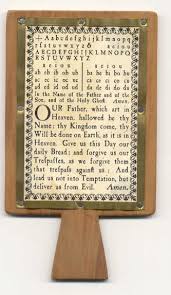
Funny but I do feel a bit of irony that we are actually headed backwards in time. Students used slates such as the one pictured for various class assignments in the 18th, 19th and early 20th Centuries. Colonial students carried a tablet called

a Hornbook. The name of these books comes from the animal horns used to make the learning device. These are the probably the first educational materials to have "apps". The apps might include the alphabet, numbers, vowel and consonant sounds, and the Lord's Prayer. Later tablets became truly interactive because students could write on them using chalk. Students used these devices to learn to read and write for many years until Big Chief notebooks and actual real books became the staple of all classrooms.

So what does the iPad have that could revolutionize education? First off the device is realitively inexpensive. With the $499 starting point it is in the reach of many families. As time goes on this price is sure to come down. Look at what has happened with iPods over the last few years. Other companies, such as Google will also manufacture similar devices which should lower the price. Next  it has a book reader with titles you can purchase from the iTunes Store. During his demonstration, Steve Jobs said textbooks would be coming.

Apple says the device weighs 1.5 pounds. Expect lots of studies to come out for the first time again about how textbook laden backpacks are harming the backs of young people. The iPad can surf the web which means students can access more information than what is in the textbook. Expect an explosion of apps for education to go along with the over 140,000 apps already in the iTunes App Store. Video and audio can be shared to create a true multimedia experience.

While the iPad is not a perfect device, this is a huge step in the right direction. There are some things that should be on future models. For examples, a webcam would be nice for adding to presentations or distance learning. An ability to show the screen on another display such as an interactive whiteboard would be nice too. There are some other tools that could and probably will be thought of as time goes on.

Get ready teachers, students will want to bring them to class. Administrators, teachers will want class sets. Network Administrators, start figuring out how to tie this devices into your networks. Everyone, start thinking of ways for students to use them productively. The educational device of our ancstors is making a comeback.